
DIR eCPR: California certified payroll, V2 XML
One worker stays one worker. Travel stays a payment. Build the V2 XML for a California public works payroll, check fringe and net, then upload it to DIR yourself through the Public Works Website Services portal.
Free to start: 1 project, 3 report downloads. Unlimited $19/month. No per-XML fee.
What DIR eCPR V2 changes for a small contractor
One employee, many classifications
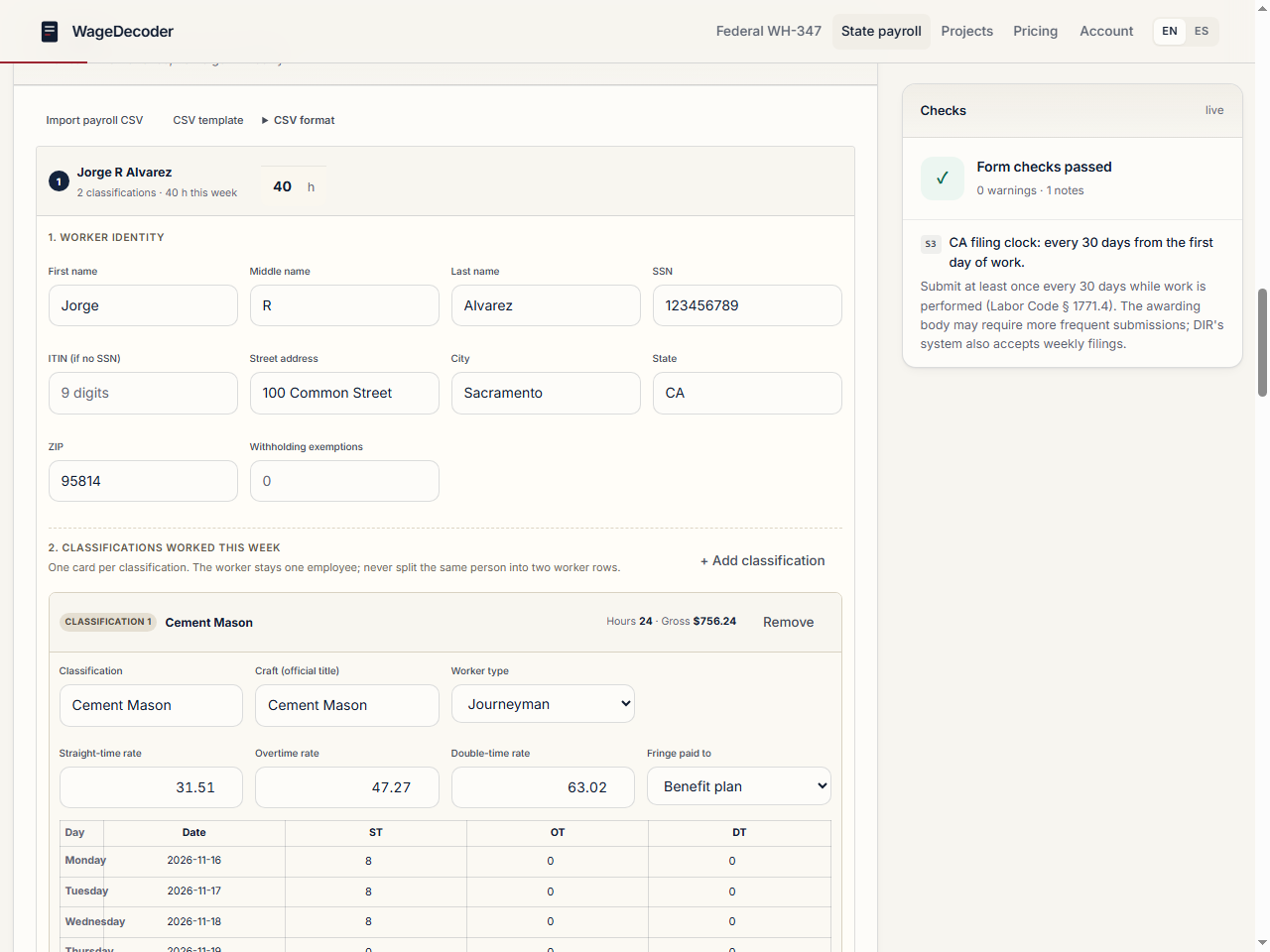
When a worker does Cement Mason and Laborer hours in the same week, keep one employee record and put both classifications inside it. Splitting the worker into two employee rows with the same SSN is one of the most common V2 failures we see.
Travel is not a deduction
Travel or subsistence is a payment. If it lands in deductions, the employee's net pay and the XML structure both go wrong. Check the payment side before you download.
Fringe has to reconcile
A zero fringe line can look fine on a form and still fail a real payroll review. Enter the plan or cash fringe that applies to the classification, and make sure gross, deductions, travel and net add up.
V2 XSD, not a renamed V1 file
DIR publishes the V2 XSD and namespace. A V1 file with a new filename is still a V1 file. The builder validates the generated XML against the published V2 schema before download.
Which California filing path are you on?
| What you are filing | What it is | Use it when |
|---|---|---|
| DIR eCPR XML upload | An XML file built to DIR's V2 XSD and uploaded through DIR's portal. | The contract or awarding body calls for electronic certified payroll; this is the path WageDecoder builds for. |
| DIR eCPR online form | The same certified payroll data keyed directly into DIR's system. | A very small payroll, or a filing account that is not set up for XML upload. |
| A-1-131 paper form | A paper payroll reporting form, not the XML upload. | A prime or awarding body asks for a signed paper copy. Read the contract; some jobs ask for both. |
A paper A-1-131 is not a substitute for the DIR eCPR electronic filing. If your prime asks for a signed A-1-131 and the job also requires DIR eCPR, produce both and keep the certified copies.
DIR eCPR login and upload: the five-step path
WageDecoder builds and checks the XML file; DIR's portal is where you file it. The portal labels can change, so DIR's eCPR portal and the agency's instructions control.
- Sign in to DIR's Public Works Website Services. Use the contractor account registered for the project. WageDecoder does not create DIR accounts or store your portal password.
- Open the right project. Use the DIR project ID (often the PWC-100 number) and confirm the contractor and contract before you attach anything.
- Choose Submit, then XML. The manual path is Submit, then Manual; use it only when the payroll is small enough to key in or the project is not set up for XML.
- Attach the V2 XML and review validation. Complete the contractor, contract and project-ID fields, say whether the file amends an earlier payroll, then upload. If DIR reports a schema or field error, fix the file and upload again.
- Sign the Statement of Compliance and submit. Save the confirmation and keep the XML with the project records. A confirmation screen is not a substitute for your own retention copy.
A V2 XML file is only one part of the filing. The payroll data still has to match the contract determination, the worker classification, and the payroll register.
Before you build the XML
Contract and determination
Use the determination incorporated in the contract, not a newer DIR table that happens to be online. Keep the project award date and the craft / county combination handy.
One identity, correct hours
Enter the worker once. Then add each classification and its daily straight-time and overtime hours. Don't duplicate the worker when the classification changes.
Gross, fringe, travel, net
Build the pay from the classification rates. Put travel in payments, not deductions. Check the net against the payroll register before you export.
Validate before upload
Open the XML against DIR's V2 XSD, then upload it through the DIR portal. Keep the generated file and the accepted filing record together.
Why eCPR files get rejected
- Two employee rows, one SSN. A worker with two classifications was split into two employees instead of one employee with two classification entries.
- Travel treated as a deduction. The payment is netted out of deductions, so gross, net and the payment total no longer reconcile.
- Fringe left at zero. The XML may be structurally valid, but the payroll does not show the fringe credit that belongs to the classification.
- A V1 file renamed to V2. The namespace and schema version still say V1; the file is not a V2 XML.
- No reconciliation. Gross, deductions, travel and net do not add up, or the employee totals do not match the payroll register.
These are not abstract warnings. In our same-payroll tests, a free eCPR tool produced two employee rows for one worker, put travel in deductions, left fringe at zero and wrote a V1 file. The same payroll built as one employee with two classifications, travel in payments and fringe populated validated against DIR's V2 XSD.
What one corrected payroll looks like
| Field | Sample value | Why it matters |
|---|---|---|
| Employees | 1 | One worker, not two rows with the same SSN. |
| Classifications | 2 (Cement Mason 24h + Laborer 16h) | Both classifications stay inside the same employee record. |
| Gross | $1,204.24 | Straight time plus overtime across both classifications. |
| Deductions | $193.00 | Only actual deductions; travel is not here. |
| Travel | $25.00 payment | Reported on the payment side. |
| Fringe | $160.08 | Not left at zero. |
| Net | $1,011.24 | Gross minus deductions; travel does not reduce net a second time. |
| V2 XSD | Valid | Checked against DIR's published V2 schema before upload. |
Sample values from a test payroll, not a rate table. Use the determination in your contract for the actual rates.
Start with the California builder
California eCPR questions
Is California eCPR the same as federal WH-347?
No. California public works contractors file certified payroll through DIR's eCPR system; the federal WH-347 is a separate federal Davis-Bacon form. A WH-347 by itself does not satisfy the California DIR filing.
Can one worker have more than one classification in a California eCPR file?
Yes. When one worker performs more than one classification in the same payroll, keep one employee record and report each classification inside it. Do not create two employee rows with the same SSN.
Where does travel go on California eCPR?
Travel or subsistence is a payment, not a deduction. Report it in the payment side of the record, and do not net it out of deductions.
Is A-1-131 the same as DIR eCPR?
No. A-1-131 is a paper payroll reporting form; it is not the DIR eCPR XML upload. Some primes still ask for a signed A-1-131, so read the contract and produce both when required.
What is the DIR eCPR V2 deadline?
DIR's V2 XSD is live. V1 remains accepted through 2027-01-13. Check the DIR filing portal and the contract before each upload; the exact cutover can affect an older file.
Does WageDecoder upload the XML to DIR for me?
No. WageDecoder builds and checks the XML; the contractor or subcontractor uploads it through DIR's Public Works Website Services. That keeps the filing account and certification with your company.
How do I log in to DIR eCPR?
Use DIR's Public Works Website Services / eCPR portal and sign in with the contractor account registered for the project. WageDecoder does not create DIR accounts or store portal credentials. Follow DIR's login screen and the project instructions.
How do I upload a DIR eCPR XML file?
After signing in, open the project, choose Submit and then XML, confirm the contractor, contract and DIR project ID, attach the V2 XML, review the validation result, sign the Statement of Compliance, and submit. DIR's Upload eCPR guide controls if the portal labels differ.
Official sources
- DIR — eCPR filing portal checked 2026-11-24
- DIR — Certified Payroll Reporting checked 2026-11-24
- DIR — eCPR V2 XSD checked 2026-11-24
- DIR — Public Works checked 2026-11-24
- California Labor Code § 1771.4 checked 2026-11-24
- eBacon — DIR eCPR V2 update summary date reference
The Certified Payroll Brief
California eCPR changes, without the portal guesswork.
One rule, one deadline, one rejection fix — every other Tuesday. Free for contractors filing their own payroll.