
California eCPR XML generator, built against DIR V2
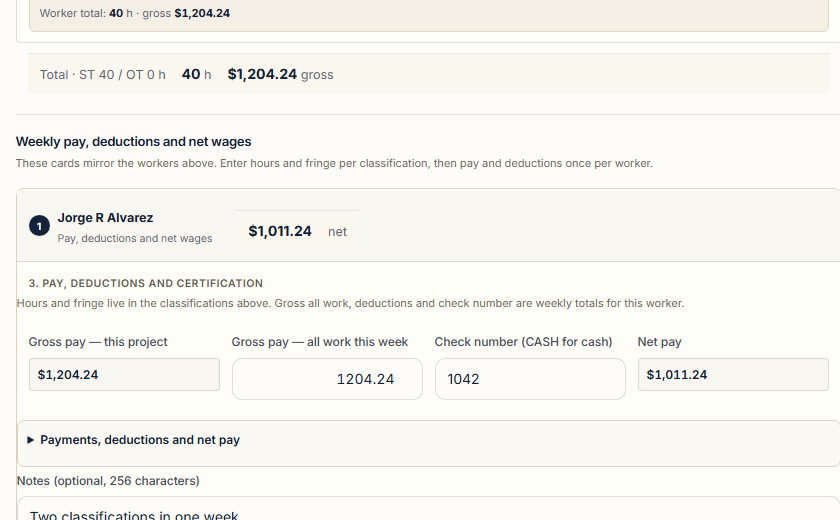
Build the XML for a California public works payroll without turning one worker into two employees. The builder keeps classification hours inside one employee record, puts travel on the payment side, and checks the totals before you download.
Free to start: 1 project, 3 report downloads. Unlimited $19/month. No per-XML fee.
What the builder produces
| Part of the file | What you enter | What the builder checks |
|---|---|---|
| Employee identity | Worker name and identifying payroll fields. | One worker record; no duplicate employee row when a second classification is added. |
| Classifications | Craft / classification, straight-time and overtime hours, rate. | Each classification stays inside the same employee; hours and rate feed the pay calculation. |
| Payments | Straight time, overtime, travel or subsistence, other payments. | Travel is on the payment side; it is not treated as a deduction. |
| Deductions | Taxes and other payroll deductions. | Deductions are separated from travel; net pay is recalculated. |
| Fringe | Plan or cash fringe that applies to the classification. | Fringe is visible per classification and is not silently left at zero. |
| XML | The V2 fields for the payroll week. | The generated file is checked against DIR's published V2 XSD before download. |
The checks that matter on a small payroll
No duplicate SSN
Adding a second classification should not create a second employee. The builder starts from the worker and adds classification rows underneath.
Travel is not netted out
A travel allowance paid to the worker belongs in payments. Putting it in deductions changes the net and can make the file fail a payroll review.
Gross − deductions = net
The builder recalculates the employee total after every change, so a stale gross or a missing deduction is visible before export.
V2 XSD, not a renamed V1
The XML is generated with the V2 namespace and validated against the published V2 XSD. A V1 file with a V2 filename is not the same thing.
How it works
Add the project. Enter the project and the determination that controls the work. Keep the contract version; a newer rate table does not replace it.
Add the worker once. Enter identity and payroll information. Add the first classification and its daily hours.
Add any second classification. Keep the same employee. Enter the second craft, rate and hours; confirm the SSN did not duplicate.
Check pay, then export. Confirm travel is a payment, fringe is populated, gross/deductions/net reconcile, and the XML validates against the V2 XSD. Upload it through DIR yourself.
Who it is for — and what it does not do
Built for the small California subcontractor that has to file a weekly payroll but does not have an enterprise payroll department. One project, a handful of workers, and a classification change in the middle of the week is the normal case here.
It is not a DIR portal account and it does not submit the filing for you. It does not replace the awarding body's instructions, the contract's determination, or the official DIR validation. It also does not turn a paper A-1-131 into an electronic eCPR filing; if your prime asks for a signed A-1-131 as well, produce that separately.
California eCPR XML questions
Does this generator produce a file DIR accepts?
It produces XML built to DIR's published V2 XSD and validates the file against that schema before download. DIR makes the final acceptance decision when you upload through its portal, so check the file and the filing requirements before you submit.
Can I put one worker in two classifications?
Yes. Keep one employee record and add both classifications inside it. Do not create two employee rows with the same SSN; that is the split-worker problem the builder is designed to avoid.
Does the builder upload the XML to DIR?
No. It builds and checks the XML. You upload it through DIR's Public Works Website Services portal with your own filing account, so the certification stays with your company.
Does it handle travel and fringe?
The builder has separate payment and deduction fields. Travel belongs in payments, not deductions. Enter the fringe that applies to each classification, then check gross, deductions, travel and net before download.
Official sources
- DIR — Certified Payroll Reporting checked 2026-11-24
- DIR — eCPR V2 XSD checked 2026-11-24
- DIR — Public Works Website Services filing portal
Build the California XML before the next payroll closes
One worker, two classifications, travel in payments, V2 XSD validation. Start with the free plan; no per-XML fee.